Check the impact of a change
This guide shows you how to see what a change in the code does to the model before the model changes. You need the editor role. The project must already follow a ref of the repository: see Import a repository.
Know what is available
Section titled “Know what is available”Vellum compares one ref, one commit or the head commit of one pull request with the model. The comparison is a list of proposals that you can read and cannot accept, and an impact report.
These parts of change impact are not available.
- A scan does not accept a pull request address. Give the repository and the pull request number.
- A scan does not accept a base commit and a head commit. It reads one commit and compares its contracts with the model. It compares its source patterns with the snapshot that the model follows, not with the base commit of a pull request.
- Vellum writes nothing to GitHub. It posts no report to a pull request and sets no commit status. A CI job can read the report and fail on an opt-in gate: see Report impact in pull request CI.
Scan the other ref
Section titled “Scan the other ref”- Select Import in the left toolbar.
- In Repository, enter the repository that the project follows, as
owner/nameor a GitHub URL. - In Read, select Branch. In Branch or tag, enter the branch of the change, for example
remove-outbox. To read one commit, select Commit SHA and enter the full SHA. - In Only these folders, enter the same folders as the scan that the project follows. Leave it empty for all folders.
- Select Scan repository.
The scan list shows the ref, the commit and the word comparison.
The request is POST /api/projects/{projectId}/imports. The curl examples use the session cookie of a signed-in person in the file vellum.cookies. Use the HTTP API shows how to sign in. An agent token cannot scan a branch, a tag or a commit: the answer is 403. A token with the scan-pull-request scope can scan a pull request of a repository that the project follows.
curl -X POST "http://localhost:8080/api/projects/<project-id>/imports" \ -b vellum.cookies \ -H "Content-Type: application/json" \ -d '{"repository":"acme/orders","ref":"remove-outbox","includePaths":null,"excludePaths":null}'| Field | Accepted value |
|---|---|
repository |
owner/name, or the address of the repository page on the GitHub host of the workspace. |
ref |
A branch, a tag or a commit SHA. At most 255 characters. No white space. With no ref, the scan reads the default ref. |
pullRequest |
A pull request number, from 1. Give ref or pullRequest, not both. |
includePaths |
Path prefixes to scan. With none, the scan reads the full repository. |
excludePaths |
Path prefixes to leave out. |
Scan a pull request
Section titled “Scan a pull request”- Select Import in the left toolbar.
- In Repository, enter the repository of the pull request.
- In Read, select Pull request #. In Pull request number, enter the number, for example
1. - Select Scan repository.
Vellum reads the pull request from GitHub. It reads the head commit of the pull request and nothing else. It writes nothing to GitHub.
The scan list shows pull request #1, the head commit, the word comparison, and the title, the state and the branches of the pull request.
curl -X POST "http://localhost:8080/api/projects/<project-id>/imports" \ -b vellum.cookies \ -H "Content-Type: application/json" \ -d '{"repository":"acme/orders","pullRequest":1}'GET /api/projects/{projectId}/imports/{importId} gives pullRequestNumber and pullRequest. Vellum records pullRequest when the scan reads the pull request.
Field of pullRequest |
Meaning |
|---|---|
number, title |
The pull request. The title is text of the repository. |
state, merged |
open or closed. A merged pull request is closed with merged: true. |
baseRef, baseSha |
The base branch and its commit when the scan read the pull request. |
headRef, headSha |
The head branch and its commit. The scan reads headSha. |
headRepository, fromFork |
The repository of the head branch. fromFork is true when it is not the repository of the scan. |
A closed or merged pull request is scanned. A note on the scan says that it is closed or merged. The head commit of a merged pull request is not the merge commit.
| Error code | Cause | What to do |
|---|---|---|
pull_request_not_found |
GitHub has no pull request with this number that Vellum can see. | Check the number. |
not_found |
GitHub has no repository with this name that Vellum can see. A private repository without a token gives this code. | Save a token in Settings → GitHub. See Connect GitHub. |
pull_request_head_unreadable |
The pull request comes from a fork, and GitHub does not serve its head commit through the repository of the scan. Vellum reads no other repository. | Push the branch to the repository and scan the branch. |
A pull request from a fork is scanned when GitHub serves its head commit through the repository of the scan. GitHub does this for the pull requests that it keeps. Vellum then cites the source lines in the repository of the scan.
Know when a scan is a comparison
Section titled “Know when a scan is a comparison”GET /api/projects/{projectId}/imports/{importId} gives kind, trackedRef, canDecide and canDecideReason.
| Scan | kind |
Can you accept from it? |
|---|---|---|
| The ref that the accepted facts follow | tracking |
Yes. |
| A ref, when the repository has no tracked ref yet | tracking |
Yes. |
| Another branch or tag | comparison |
No. |
| A commit SHA | comparison |
No, and it cannot become the tracked ref. |
| A pull request | comparison |
No, and it cannot become the tracked ref. Scan the tracked branch after the merge. |
A comparison scan writes nothing to the model. It marks no fact stale.
Read the comparison
Section titled “Read the comparison”- On the completed scan, select Review
proposals or Open review. - Read the note at the top. It names the ref that the model follows.
- Read the proposals.
| Action | Meaning for the change |
|---|---|
| Add | The other ref has a thing that the model does not have. |
| Change | The other ref differs from a fact that an import wrote. The table shows Field, In the model and In the source. |
| Conflict | The other ref differs from a value that a person set. |
| Remove | The scan looked at the source of an accepted fact and did not find it. |
| Match | Vellum cannot tell which found fact is the one in the model. |
- Select a proposal. Read the source lines that support it.
- Read Accepting this breaks:. This list shows what the model loses if the proposal is accepted.
The list has these items.
- For a Remove: the stored scenarios that name the item, with the steps, the assertions and the faults that name it. Also the items of the model that point at it, such as relationships.
- For the Remove of a binding: the publish steps whose message no longer reaches a subscription.
- For a Change of the schema of a message or of the route of an operation: the stored scenarios that use it.
Vellum computes the list from the model and the scenarios as they are now.
If the scan shows The source matches the model. This scan proposes no change., the other ref changes nothing that the extraction rules read.
Read the impact
Section titled “Read the impact”- On the completed scan, select Impact. For a pull request, the header gives its number, title, state, and its head and base commits.
- Read Changed in the source. It lists each proposal of the scan, and each source pattern that the scan and the base snapshot do not both have. The base is the scan that the model follows.
- Read Affected flows. Each flow lists its affected steps in the order of the scenario. Each step has a label, and one line for each change that reaches it, with the source lines of that change. Select the name of a change to go to its entry with the diff.
- Read Affected promises.
- On a source pattern check of a promise, select Run against this scan.
- Select Brief for this change to export a brief for an agent. The brief lists the affected steps.
When the base commit of a pull request is not the commit that the model follows, the report adds a line to its notes. A change on the base branch after that commit then shows as a change of the pull request.
Labels of a step
Section titled “Labels of a step”| Label | The step |
|---|---|
| Definite | names a contract that the change removes or changes: the operation it calls, or the message or the schema it publishes. The contract diff and its source lines are in the report. |
| Possible | runs in or against an element that the change touches: the service of a changed source pattern, or the element that owns a changed contract. Nothing shows that the step uses what changed. |
| Unknown | runs in the service of a source pattern that the scan did not look at. |
See the steps on the canvas
Section titled “See the steps on the canvas”- On an affected flow, select Show on canvas. The dialog closes.
- The canvas draws each affected step from the element where it starts to the element it reaches. A publish step with no handler goes to the consumers of its message. The line and the ring of each element have the label of the step: solid for Definite, dashed for Possible, dotted for Unknown. The label of each line gives the step number and the label in words.
- The panel at the top lists the steps in order. A step whose two ends are one element on this level is not drawn. Open the element to see it.
- Select Clear to remove the marks.
Play the flow with the impact
Section titled “Play the flow with the impact”- On an affected flow, select Play. The trace panel opens.
- The row Impact of … lists the affected steps. Select a step to go to its first event.
- In the bar of events, a line below an event marks a step that the change reaches. The line has the colour and the style of the label.
- Step to an event of an affected step. The panel gives Impact: with the label, and each change with a link to its source lines.
Each entry has one label.
| Label | Meaning |
|---|---|
| Definite | The entry stands on a contract diff or on source lines that the report cites. |
| Possible | The entry is reached only through a flow or a service. Nothing shows that it depends on the change. |
| Unknown | The scan did not look where the answer is. |
A promise has one more label.
| Label | Meaning |
|---|---|
| Broken | A check of the promise failed against this scan. |
| At risk | The change touches something that the promise names. No check failed against this scan. |
| Possibly affected | The promise is reached only through an affected flow. |
The report reads the source. It runs no check and it changes nothing. A promise that names nothing that changed is not in the report.
Run the checks against the scan
Section titled “Run the checks against the scan”Select Run checks against this scan in the Gate box. Vellum runs the source pattern check of each approved promise that names the repository, against the snapshot of this scan. You need the editor role. Each run records the scan and its commit.
| Result | The check |
|---|---|
| Passed | found the pattern at this commit. |
| Failed | did not find the pattern, and the scan read every file where the pattern would be: the project directory of the service, or the whole repository, and every file where the pattern was found before or where the snapshot that the model follows declares it. |
Unknown (unsupported) |
did not find the pattern, and the scan did not look everywhere: a limit stopped it, or its folders left a place out. This never fails the gate. |
A result against a comparison scan is for that commit only. The promise keeps its result against the ref that the model follows, and Build Ready does not change. The result shows in the impact report of this scan.
The request is POST /api/projects/{projectId}/imports/{importId}/impact/checks. An agent token with propose can call it for any scan. A token with only scan-pull-request can call it for a scan that it started.
A check runs once against a comparison scan: a second call returns the first run. These runs have their own bound of 5,000 for each obligation of a revision. They never use up the 1,000 runs against the ref that the model follows. Each new run takes one unit of the run rate of the caller, 120 in a minute. When the rate is used up, the answer is 429, and the next call goes on where the last one stopped.
When the service of the check is not found under the key that the accepted import linked, the result is Unknown. This happens when the directory of the service moved, or when a second project file is in its directory. Accept a scan of the followed ref to link the service again.
The request is GET /api/projects/{projectId}/imports/{importId}/impact.
Copy the compact report
Section titled “Copy the compact report”Select Copy report. The clipboard holds the compact report as Markdown, as a CI job reads it. It holds the gate verdict, the changes with their source references, the affected steps, the promises with the results of their checks against this scan, and the unknowns. Long lists are cut, with a line that says how many entries are not shown.
The request is GET /api/projects/{projectId}/imports/{importId}/impact/report. Send Accept: application/json for JSON.
Set the gate policy
Section titled “Set the gate policy”The Gate box at the top of the dialog shows the policy of the project and its verdict on this scan. You need the owner role to change the policy. The audit log of the workspace records each change.
| Policy | Verdict |
|---|---|
| Off: never fails | off. The default. |
| Fail on a broken approved promise | fail when an approved promise is Broken: a deterministic check of it failed against this scan. Else pass. |
At risk, Possibly affected and Unknown never fail the gate. A draft promise never fails the gate.
A check that did not run cannot fail the gate. Run the checks against the scan before you read the verdict.
The requests are GET and PUT /api/projects/{projectId}/impact-gate, with the body {"policy":"fail-on-broken"}.
Example: a pull request that removes the outbox
Section titled “Example: a pull request that removes the outbox”The model follows main of acme/orders. On main, orders-api registers a transactional outbox. Vellum holds the accepted fact Transactional outbox from the rule dotnet.masstransit-outbox.
Pull request #1 merges the branch remove-outbox into main. The branch deletes the outbox registration, publishes OrderCreated directly to the broker and gives the field total of OrderCreated the name totalAmount. The GitHub stand-in of the import tutorial serves this pull request.
-
Scan pull request
1. The scan is a comparison. -
Select Impact. Changed in the source has the line Removed Transactional outbox with the label Definite and the source lines of
mainwhere the registration was. -
Read Affected flows. In the flow Place an order, the step that publishes
OrderCreatedhas the label Definite: it names the message whose schema changed. The steps that callPOST /ordersand write the order have the label Possible: they run inorders-api, the service of the outbox.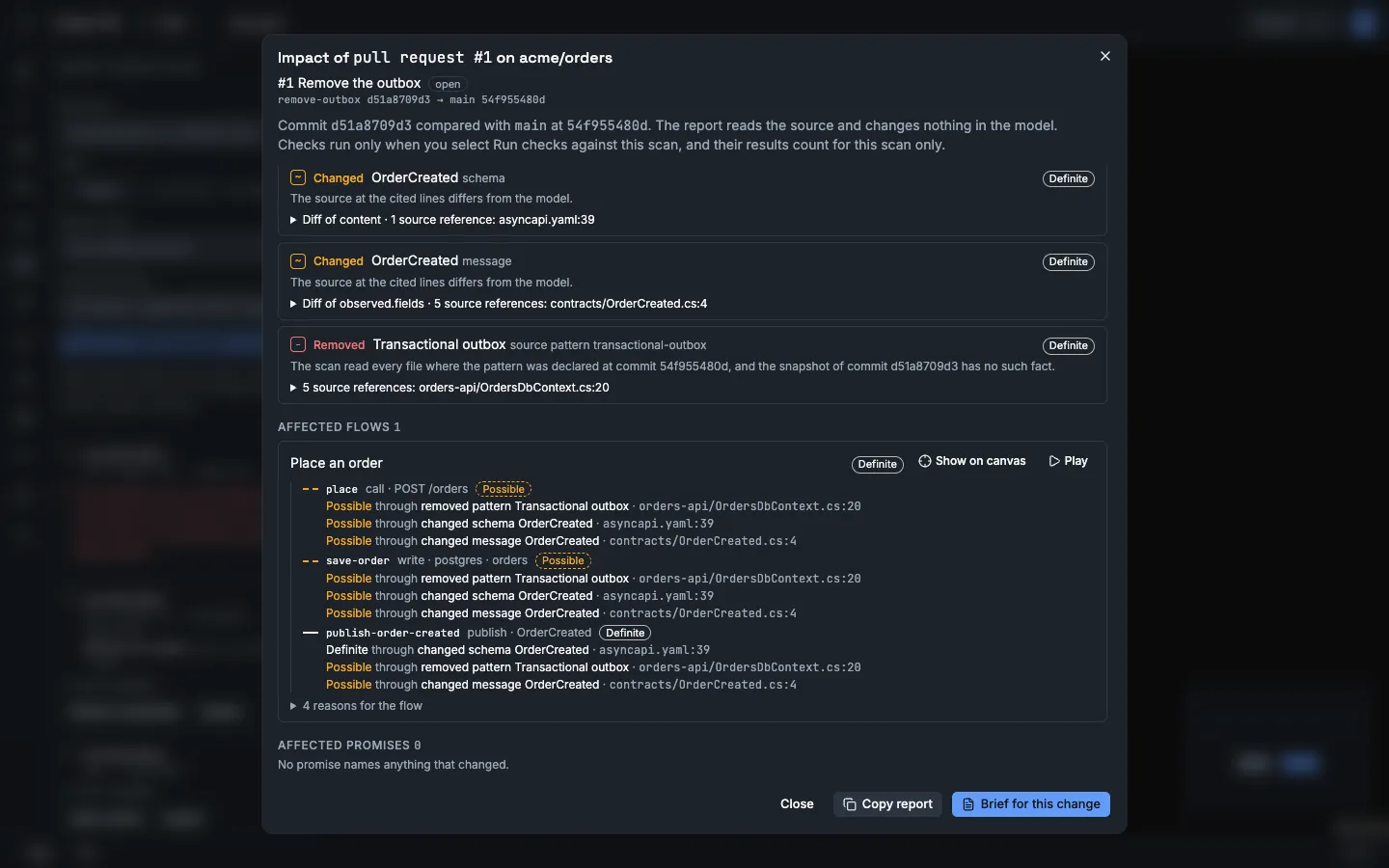
-
Select Show on canvas and open the system
orders. The line fromOrders.ApitoBillingis solid, with the label 3. OrderCreated · Definite. The line fromOrders.Apitopostgresis dashed, with the label 2. postgres · orders · Possible.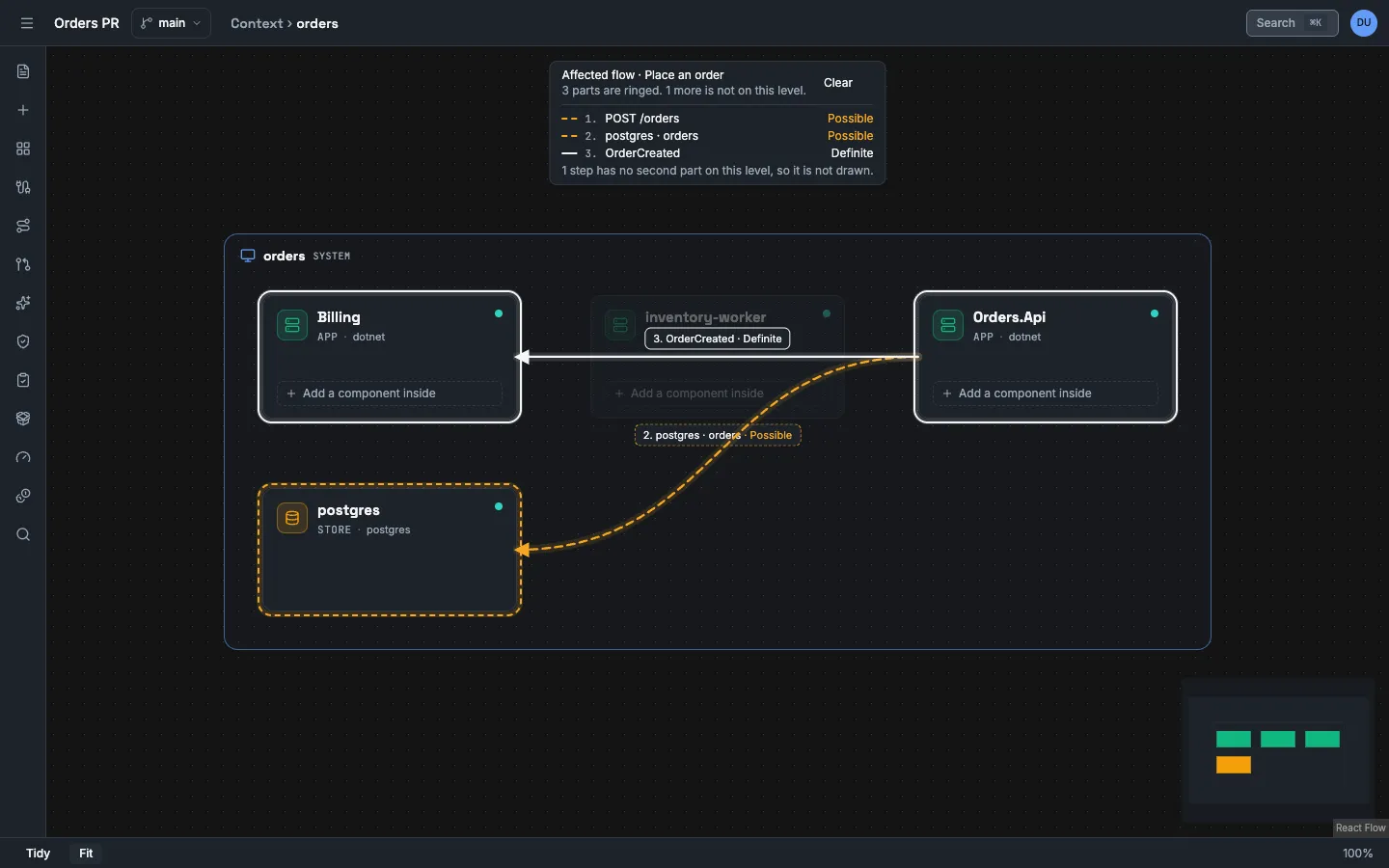
-
Read Affected promises. A promise that requires the pattern has the label At risk.
-
Select Run checks against this scan. The source pattern check of the promise is Failed: the scan read every file of the commit, and the outbox registration is gone. The promise is now Broken in this report. With the policy Fail on a broken approved promise, the gate is Fail.
-
Open the promise. Its result against
mainis the same as before.
The comparison shows that the registration is gone from the source. It does not show that an order is lost when the broker is down. Only a test in the repository can show that.
Check what the scan did not look at
Section titled “Check what the scan did not look at”A missing fact counts only when the scan read the files that the fact came from.
- A partial scan shows This scan is partial. A limit stopped it before every file was read, so it proposes no removals and missing items prove nothing. The notice is not exact. A partial scan proposes no removal for a fact whose files it did not read. It can propose a removal for a fact whose files it read.
- A scan with fewer folders says nothing about the facts in the other folders.
- The review states how many accepted facts the scan did not judge, and why.
In the API, coverage.linkedFacts gives the counts.
| Field | The scan did not judge the fact because |
|---|---|
scope |
The scope, an exclude pattern or the path filter left out a file of its evidence. |
limit |
A limit of the scan left out a file of its evidence. |
withheld |
A file of its evidence holds a secret or is not text. |
failed |
A file of its evidence could not be fetched, verified or parsed. |
A fact that the scan did not judge gets no removal proposal.
Follow the other ref
Section titled “Follow the other ref”Do this when the change is merged, or when the model must follow the branch.
- In the scan list, select Follow this ref on the comparison scan.
- Open the review again. You can now accept and reject.
The request is POST /api/projects/{projectId}/imports/{importId}/track.
Vellum makes the ref the tracked ref of the repository in this project. It plans the scan again as a tracking scan. The scan records who did this and when.
| Status | Type | Cause |
|---|---|---|
409 |
import_not_completed |
The scan is not completed. |
409 |
ref_not_trackable |
The scan read a commit SHA or a pull request, and no ref. Scan a branch or a tag. |
409 |
already_tracked |
The accepted facts already follow this ref. |
409 |
newer_scan_exists |
A newer scan of the same ref is completed. Follow that scan. |
409 |
model_busy or scan_changed |
Another write ran at the same moment. Nothing was written. Try again. |
When the change merges into the tracked branch, you do not need Follow this ref. Scan the tracked branch again.
What goes stale after you accept
Section titled “What goes stale after you accept”- A tracking scan that no longer finds the source of a fact with the label Observed in source marks the fact stale and proposes its removal. The fact stays in the model until you accept the removal.
- Each accepted proposal changes the model. A promise result records the model version that it read. After the model changes, the result is stale. A stale pass is not a pass.
- A review snapshot, a stress run and a bundle also record the model that they read.
Run the checks again after you accept. See Stale results and Build Ready.
What Vellum never claims
Section titled “What Vellum never claims”- A proposal states what the source shows at one commit. It does not show that the code works.
- A difference in the source is not proof of a change in behaviour.
- The items in Accepting this breaks: are the scenarios and model items that name the changed item. Vellum does not claim that other parts of the system are safe.
- Vellum does not run the code of either ref.