Import a repository
This guide shows you how to import a GitHub repository into a project. You need the editor role. A viewer can read the scans and the proposals.
An import proposes. It changes nothing in the model until you accept a proposal.
A repository is a Source of the project, and each completed scan is a Snapshot of it. See Sources, Snapshots and bindings.
Other kinds of Source
Section titled “Other kinds of Source”The review, the limits and the stale marks on this page apply to each kind of Source. To read code from another place, see these guides:
- A repository on GitLab, Bitbucket Cloud or Azure DevOps: Connect GitLab, Bitbucket or Azure DevOps.
- A folder on the machine that runs a local instance: Import a local folder.
- A
.zipor.tar.gzfile: Upload an archive. - Many repositories of one organization, group or workspace: Add many repositories.
To delete a Source, see Delete a Source.
Start a scan
Section titled “Start a scan”- Open the project and select Import in the left toolbar.
- In Repository, give the repository as
owner/nameor as its GitHub URL. The URL must be on the GitHub host of the workspace. - In Read, select Branch and give a branch or a tag in Branch or tag, or select Commit SHA and give a full commit SHA. Leave Branch or tag empty to use the Default ref of the workspace settings. If that setting is empty, Vellum uses the default branch of the repository. To read a pull request, see Check the impact of a change.
- To read only a part of the repository, give its folders in Only these folders. Separate the folders with commas. Leave the field empty to read all folders. One scan takes at most 50 paths.
- Select Scan repository.
Vellum finds the commit that the ref points to and reads the files at that commit. It does not run the code. It does not read a file that looks like a secret store or a binary.
A private repository needs a token. See Connect GitHub.
The first scan of a repository adds it to Sources. To scan a Source again at its default ref, select Scan again on the Source.
A project runs one scan of a repository at a time. Vellum refuses a second scan of the same repository until the first scan ends.
Watch the scan
Section titled “Watch the scan”The list shows each scan and its state.
| State | Meaning |
|---|---|
| Waiting to start | The scan is in the queue. Select Cancel to stop it. |
| Listing files, Reading files | The scan runs. Select Cancel to stop it. |
| Paused by the GitHub rate limit | The scan continues by itself at the time shown. |
| Scan complete | Vellum read every file in its limits. |
| Partial scan | A limit stopped the scan before it read every file. |
| Cancelled | You stopped the scan. Select Resume to continue from the files already read. |
| A failure message | The scan failed. The line says why and what to do. When a resume can help, select Resume to continue from the files already read. A failure that a resume meets again, for example a pull request that does not exist, has no Resume: start a new scan. |
The list updates by itself while a scan runs, also when the browser window is in the background. A scan that CI, the API or another session starts appears in the list within 15 seconds.
You can resume one scan 3 times. A scan that stopped more than 7 days ago cannot be resumed. Start a new scan.
Review the proposals
Section titled “Review the proposals”On a completed scan, select the button that shows the number of pending proposals, for example Review 20 proposals. The button reads Open review when no proposal is pending.
Vellum lists one proposal for each thing it found. The list has one group for each kind of thing.
| Action | Meaning |
|---|---|
| Add | The source has a thing that the model does not have. |
| Change | The source differs from a fact that an earlier import wrote. |
| Conflict | The source differs from a value that a person set. The review shows both values. Neither wins until you decide. |
| Remove | A scan that looked at the source of an accepted fact no longer finds it. |
| Match | The extraction rules changed and Vellum cannot tell which found fact is the one in the model. You choose. |
| Same as? | An element of this scan has the name of an element in the model. Vellum asks if they are the same element. |
Select a proposal to see its fields and the source lines that support it. The GitHub link opens the same lines on GitHub at the scanned commit.
A proposal states only what the source shows. A route in the code shows that the route is declared. It does not show that the route works.
The extraction rules list what Vellum reads and what each rule proposes.
Review by Source
Section titled “Review by Source”Proposals by Source in the Sources section lists the pending proposals of every Source, one group for each Source. A group starts with its “same as?” questions and its conflicts.
- Select Same when the element of this Source is the element that the other Source holds. Vellum binds the element to this Source and plans the proposals of the scan again. The values of this Source then come back as a change or a conflict.
- Select Not the same when it is another thing. Vellum proposes it as a new element and does not ask again.
- Select a conflict to see the value in the model, the value of this scan and the value of each other Source side by side.
- Select Accept all from this Source to accept every addition, change and removal of the Source in one decision. It does not accept a conflict, a question, a match, a proposal about an entity that another Source holds, a change of a truth label, or anything that depends on one of them or on a rejected proposal. If an accepted item breaks something, the group names it. Select I accept what this breaks. Accept all to accept anyway.
Select Open full review to decide the proposals of one Source one by one.
Accept or reject
Section titled “Accept or reject”- Select the proposals. Select all without conflicts selects every add, change and remove that you can decide.
- Select the accept button, for example Accept 3, or select Reject selected.
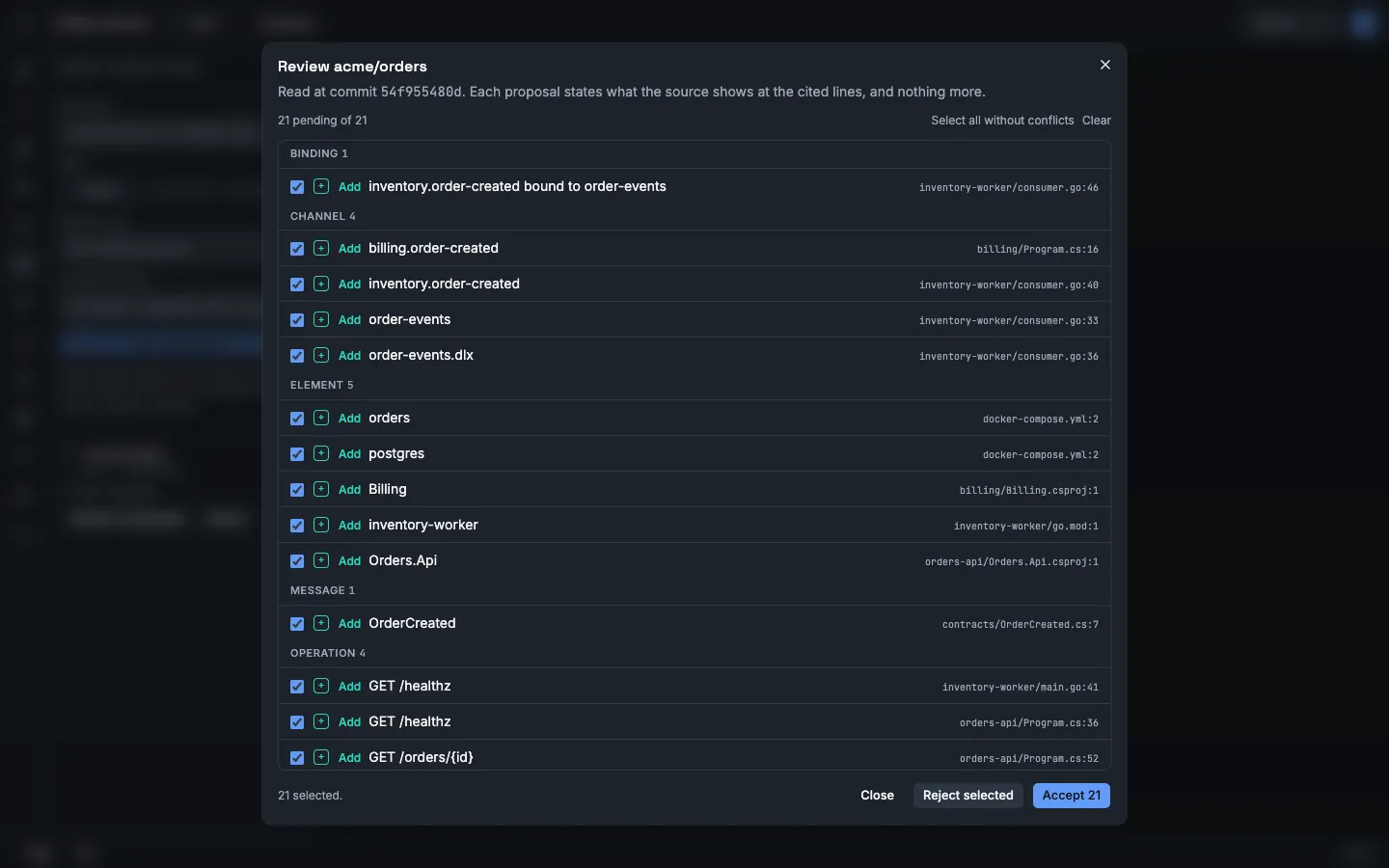
The accept button shows the number of proposals that it applies. Accepting a proposal also accepts what it depends on. For example, an operation needs its service.
If an accepted proposal breaks something, such as a scenario that uses a removed operation, the review names what breaks. Tick the acknowledgement before you accept.
A decision is applied as a whole. If one item fails, Vellum applies none and names the item. One decision holds at most 1,000 proposals.
To decide a match:
- Select the match proposal.
- Select the fact of this scan that is the thing in the model, or select None of these. The source no longer has it.
- Select Apply matches.
A match changes only the link between the fact and the model. It does not change the model.
To answer a “same as?” question in the full review:
- Select the question.
- Select Yes, the same element or No, another thing.
- Select Apply answers.
Vellum labels each accepted fact Observed in source. It records the repository, the commit, the file and lines, your account and the time. An accepted element is bound to its key in the Source. See Evidence and truth labels.
Vellum remembers a rejection. It proposes the same thing again when the source changes. It can also propose it again when a change to the extraction rules gives the fact a new key.
Scan again
Section titled “Scan again”Start a new scan of the same repository to compare the model with newer code.
- The first decision in which you accept a proposal sets the tracked ref: the branch or tag that the model follows.
- A scan of the tracked ref proposes changes and removals. It replaces the pending proposals of earlier scans of the same ref.
- A scan of another branch or tag is a comparison. You can read its proposals and you cannot accept them. Select Follow this ref to make that ref the tracked ref. Only the newest completed scan of a ref has this effect.
- A scan of a bare commit or of a pull request is always a comparison. It cannot become the tracked ref.
To see what a change in the code does to the model before you accept it, see Check change impact.
Stale facts
Section titled “Stale facts”When a scan looks at the source of an accepted fact and no longer finds it, Vellum marks the fact stale and proposes its removal. Only a scan of the same Source can do this. A fact that another Source still holds gets no mark. The canvas shows the mark. The fact stays in the model until you accept the removal.
Vellum sets the mark only on a fact with the label Observed in source. A fact that a person declared gets a removal proposal and no mark.
A scan judges a fact only when it read the files that the fact came from. A scan with fewer paths, a partial scan, or a scan that left a file out says nothing about the facts in those files. The review tells you how many facts the scan did not look at, and why.
A scan of some folders can find a thing that the model already has, and not see all of it. An example is a consumer whose message contract is in another folder. Vellum does not propose that thing as new. Scan all folders to judge it.
A later scan that finds the evidence again clears the mark.
Limits
Section titled “Limits”A workspace owner sets the limits of a scan under Settings → Import limits.
| Setting | Default |
|---|---|
| Files per import | 2,000 |
| Largest file | 262,144 bytes |
| Total size | 20,971,520 bytes |
| Excluded paths | **/node_modules/**, **/vendor/**, **/bin/**, **/obj/**, **/*.min.* |
A scan uses the limits that were set when it started.
Settings → Usage limits sets Repository scans per day. The default is 20 for one workspace. The day is a UTC day. A resume that must ask GitHub for files again counts as one scan. When the limit is reached, Vellum refuses the scan with status 429 and the code scan_limit_reached.
The review shows proposals only for things that have a place in the model. Other facts, such as an operation that has no owning service in the source, are kept as evidence and get no proposal. Open Facts with no proposal at the end of the review to read them. Each fact shows its kind, its name, the reason, the attributes the source states and a link to the cited lines. The section is read-only. GET /api/projects/{projectId}/imports/{importId}/evidence returns the same facts.
The review shows a value that is not text as unformatted JSON.